
Unlimited Devices
Download Paben VPN
Protect all your phones, tablets, laptops, and smart TVs with one subscription.
Official Android Client • v2.5.5 (Latest Release)
Paben VPN for Android
Next-Gen 10 Gbps WireGuard® encryption, CleanWeb 2.0 ad & threat shield, 100+ global server clusters, and battery-optimized background persistence. Works on Android 8.0 through Android 15+.
✓ SHA-256 Verified
✓ Zero Adware / Clean
✓ Auto-Update Support
Scan to Install on Phone
Point camera to download directly
Click to zoom
Easy Installation & Security Guide
Google Play Protect: What to do?
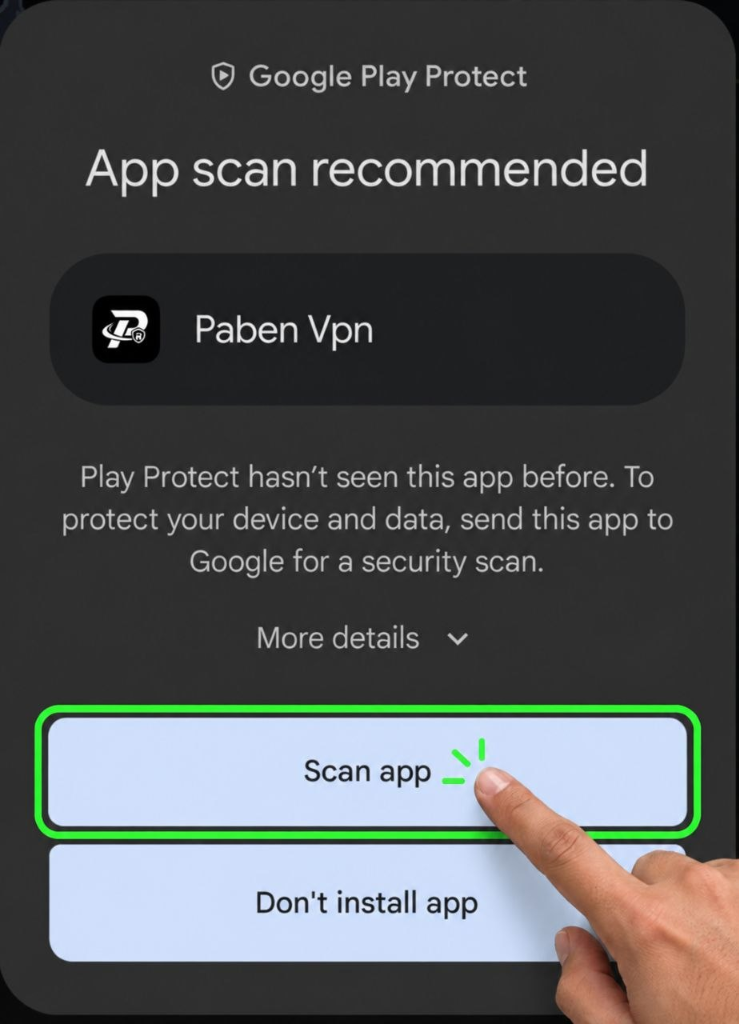
Because Paben VPN is downloaded directly as an APK from our official website, Android's Google Play Protect may display an "App scan recommended" dialog during installation.
1
Tap [ Scan app ]: When the prompt appears on your screen, simply tap the green "Scan app" button.
2
Instant Security Verification: Google Play Protect will scan the APK in 2 seconds, verifying that Paben VPN is 100% clean, safe, and virus-free before completing installation.
3
Log In & Connect: Open the app, log in with your account email and password, and connect to any global server with one tap.
Also available on all major platforms
v2.1.1 Released
Windows
Windows 10 & 11 (64-bit)
Coming Soon
macOS
Apple Silicon & Intel
Coming Soon
iOS / iPhone
iOS 15 or newer